Skip to content

For Windows 10 and 11 · No subscription

Every family photo, on a drive you own.

Plug in any USB drive. IOIHANPhoto finds every photo and video on your PC, sets the duplicates aside, and copies the rest into one organized, verified archive, with a slideshow built in. Nothing to install. Nothing uploaded. No monthly fee.

Free to download for now. Your originals are never changed.

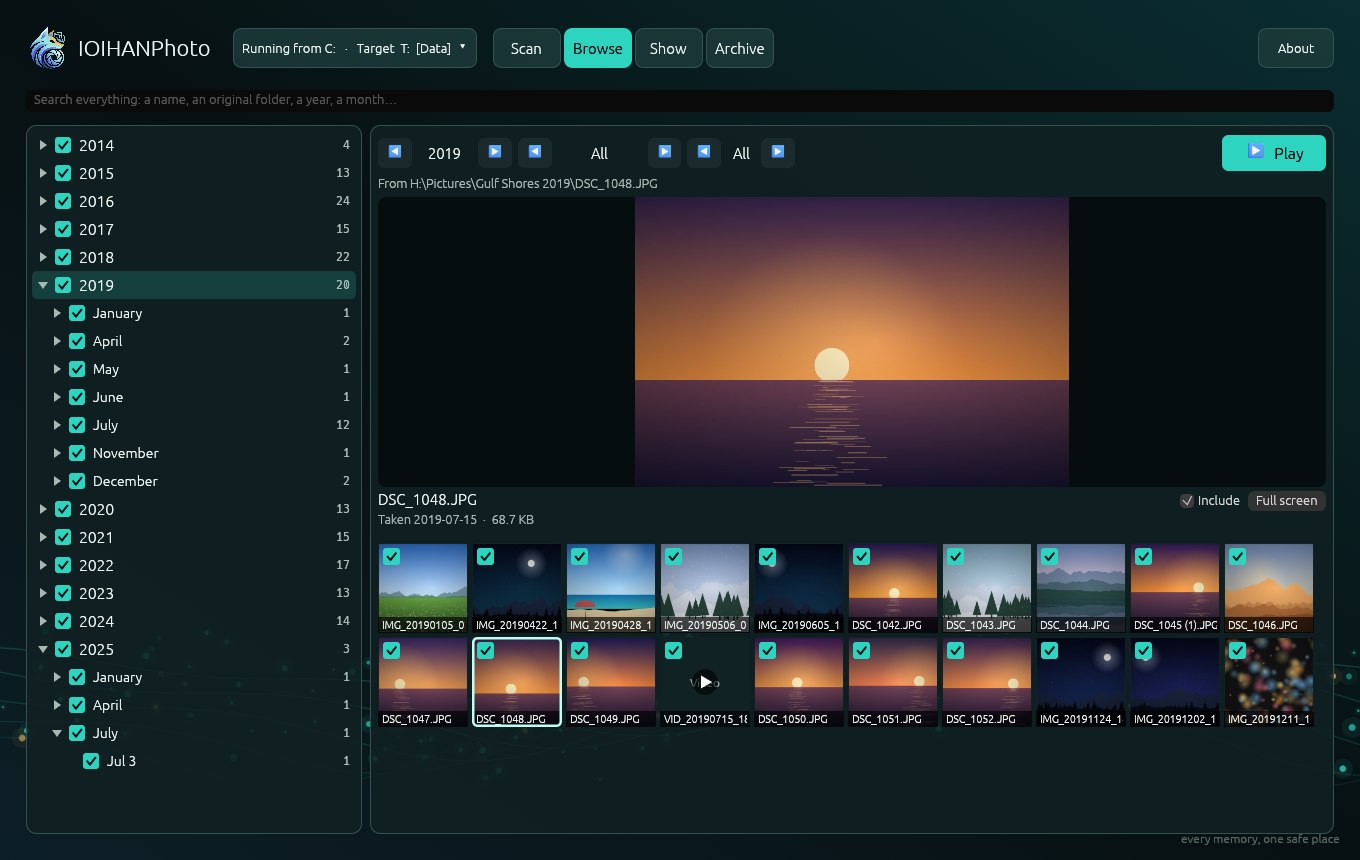
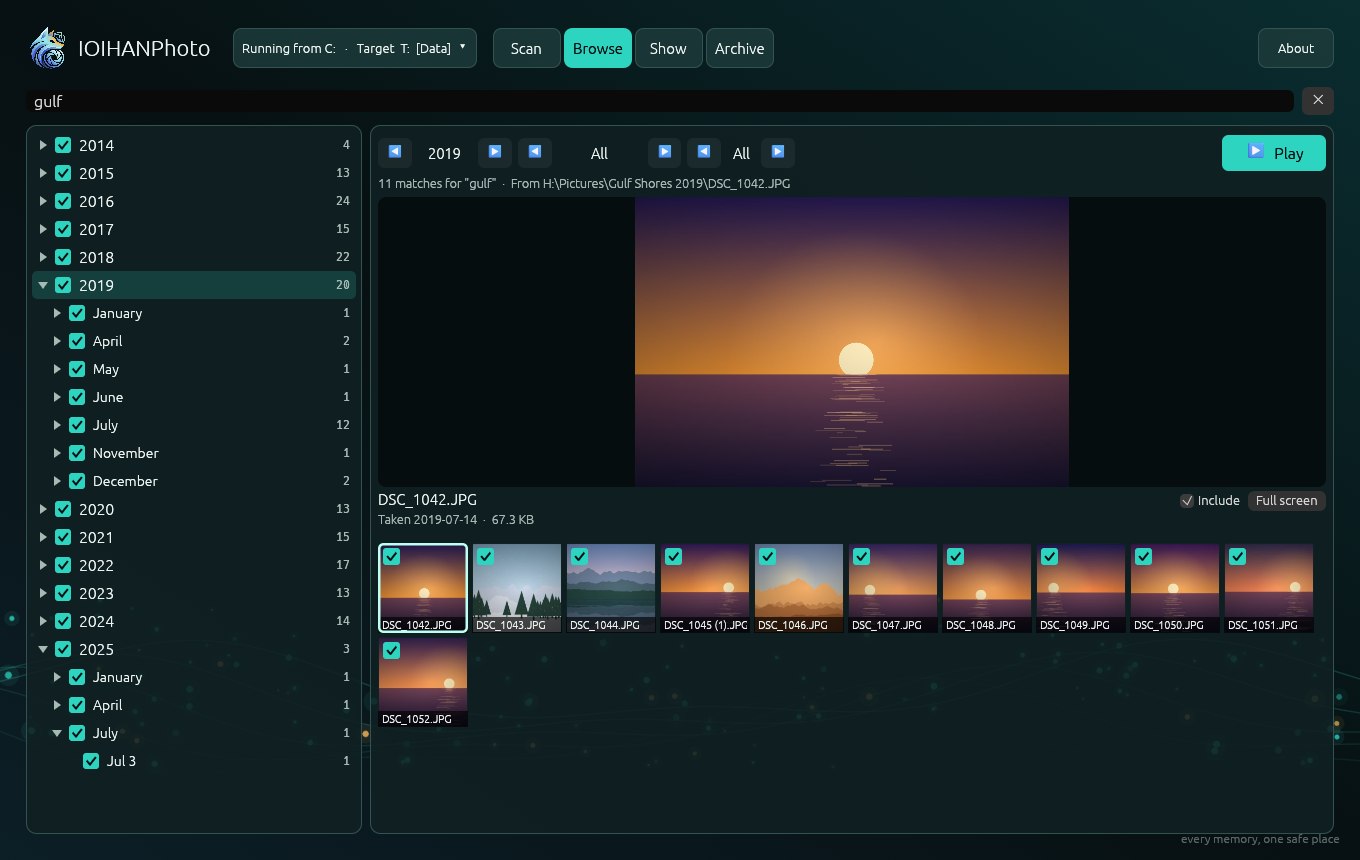
IOIHANPhoto Browse: years down the side, a large sunset photo, and a row of 2019 photos

Your photos shouldn’t need a monthly bill, or a special stick.

Phones backed up to Downloads, camera cards dumped on the Desktop, three copies of the same beach trip. Here’s how the usual ways of saving them compare.

Cloud storage

  • A monthly fee, for as long as you keep your photos
  • Everything is uploaded to someone else’s servers
  • Lose the account, lose the access

Photo backup sticks

  • You buy their stick, sized by how many photos it holds
  • A bigger collection means buying a bigger stick
  • Your memories live on one small device

IOIHANPhoto

  • Use any drive you already own, any size
  • One price, $29 once. No subscription, ever
  • Nothing is uploaded. Your photos stay yours

How it works

Simple enough for Grandma. Careful enough for everyone.

1 Scan

Find every memory on the PC

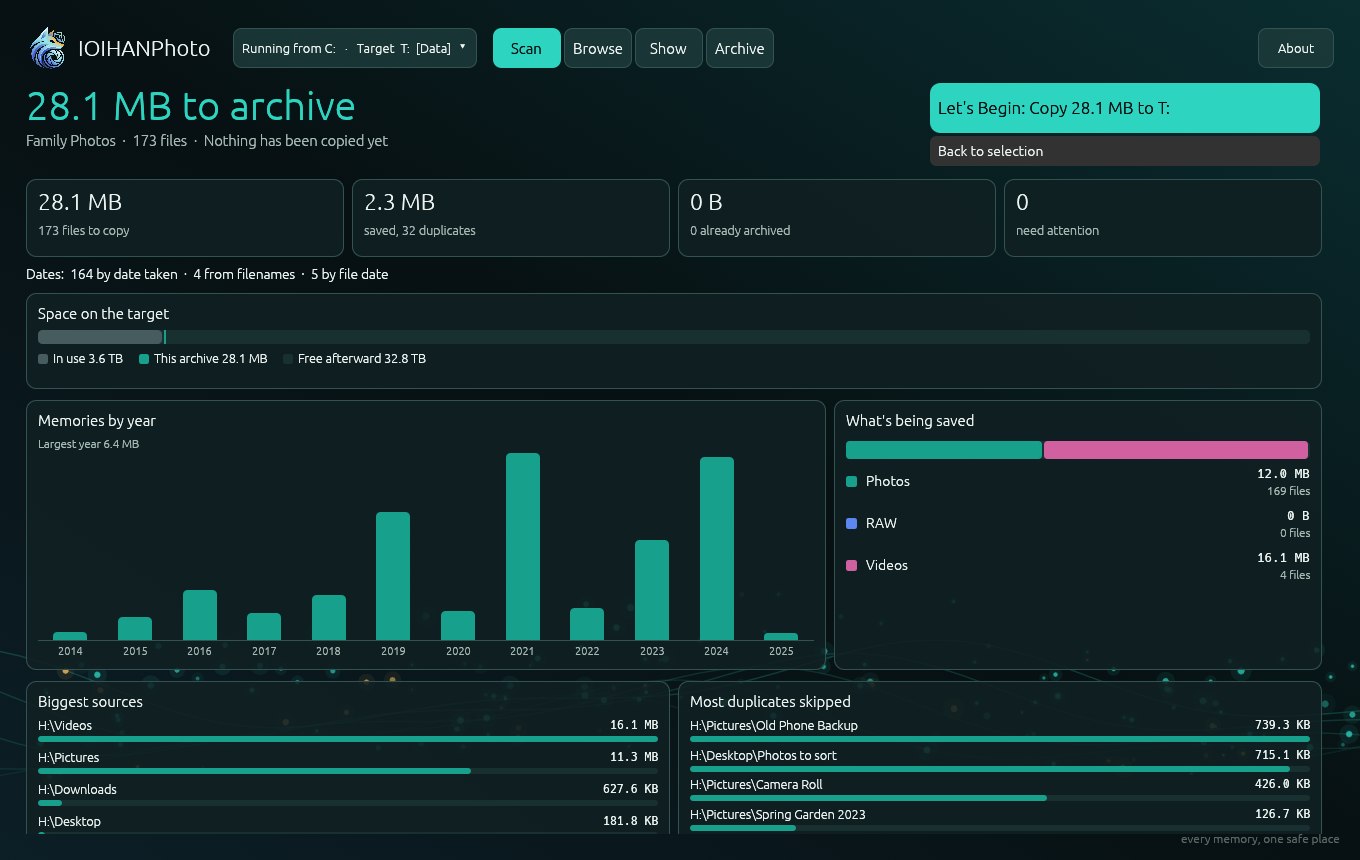
Pick “All Memories” or just the folders you care about. IOIHANPhoto looks everywhere photos hide, including the Desktop, Downloads, old phone backups and OneDrive, and shows you what it found before anything is copied: how many photos and videos, which years, and how much space the duplicates were wasting.

  • Duplicates are matched by their full contents, never by filename
  • Real dates from the camera, video and Google Takeout data
  • System and developer folders are skipped for you
IOIHANPhoto results: 28.1 MB to archive, 173 files, 32 duplicates skipped, a chart of memories by year

2 Review

Know exactly what will happen

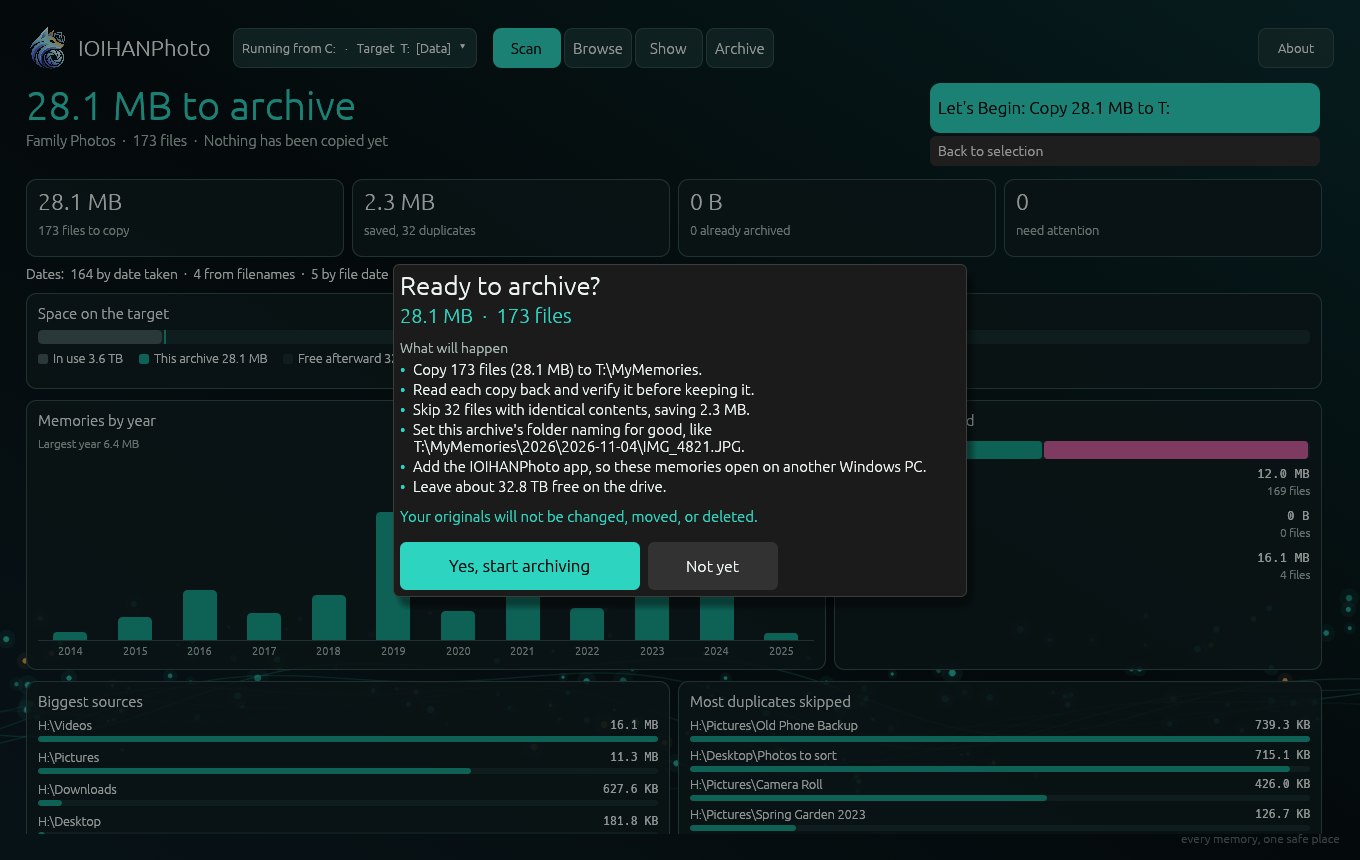
Before a single file moves, a plain-English summary shows what will be copied, where it goes, what is skipped and how much room will be left. Nothing starts until you say yes.

  • Every copy is read back and checked before it’s kept
  • Your originals are never changed, moved or deleted
  • Room on the drive is checked first
The Ready to archive confirmation listing what will be copied, verified and skipped

3 Archive

One tidy timeline, verified

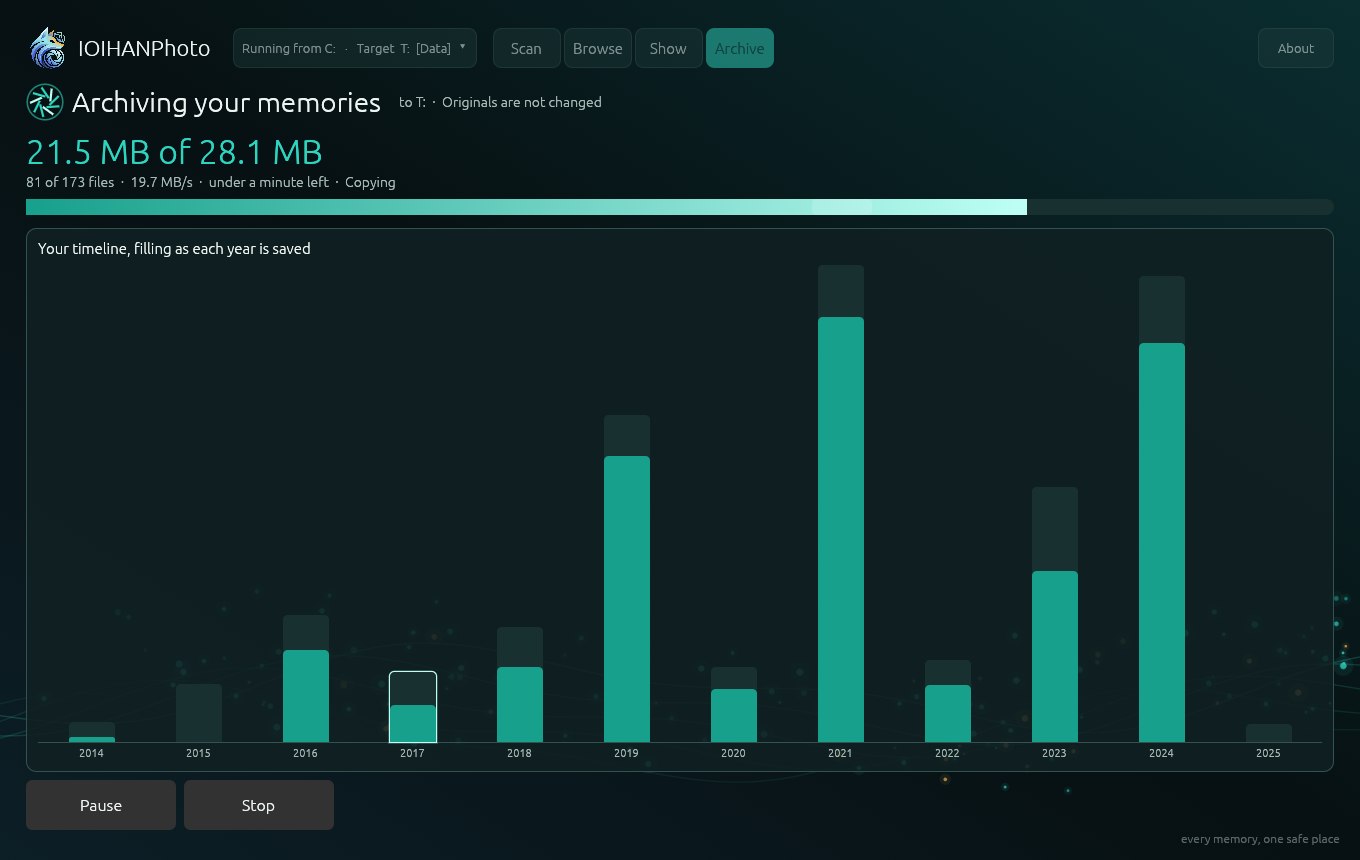
Photos and videos are copied into one folder per year and day, like MyMemories\2019\2019-07-14. Watch your timeline fill in as each year is saved. Run it again next month and only the new photos are copied.

  • Never overwrites: a different photo with the same name is kept as well
  • OneDrive “online only” photos are downloaded, saved, then set back to online only
  • Stop any time; it picks up where it left off
Archiving in progress: 21.5 MB of 28.1 MB, with a timeline of years filling in

4 · Enjoy

Hand someone the drive. The slideshow comes with it.

IOIHANPhoto leaves a copy of itself on the drive. Plug it into any Windows PC, open it, and step through the years, months and days, search for a trip or a folder, or press Play for a full-screen slideshow. Anyone you give the drive to can browse and watch, at no cost.

Searching for gulf finds 11 photos from the Gulf Shores 2019 folder

Browse and search

Forward and back by year, month and day. Search by name, date, or the folder a photo originally came from.

Show

A full-screen slideshow with gentle crossfades. Pick 3, 5, 8 or 12 seconds per photo; Space pauses, the arrow keys step.

Thoughtful where it counts

Bring your own drive

A thumb drive from the drawer, a big external disk, whatever you have. The archive is plain folders that any computer can read.

True duplicates only

Cameras reuse names like IMG_0001. IOIHANPhoto compares the actual contents, so a copy is caught and a different photo is never lost.

The right dates

Uses the date the photo was taken, then video data, Google Takeout files and dates in filenames, before the file date.

Captures OneDrive

Photos stored “online only” are brought down, saved and verified, then released so the PC doesn’t fill up.

Add more any time

Run it again, or on another PC, and only what’s missing is copied. Nothing already saved is touched.

Search remembers

Find a photo by name, year, month, or the folder it originally came from, even after it’s organized.

Nothing to install

One program file. Run it from the PC or straight from the drive. It doesn’t change Windows settings.

Signed by IOIHAN

The program carries IOIHAN, LLC’s digital signature, so Windows can confirm who made it and that it hasn’t been altered.

Our promise

The same promise is printed inside the app.

  • Your originals are never changed, moved, or deleted.
  • An existing archive file is never overwritten.
  • Duplicates are matched by full contents, never by filename.
  • Running it again copies only what is missing.
  • Your photos stay on your drives. Nothing is uploaded.

Know it’s really from us

IOIHANPhoto is digitally signed by IOIHAN, LLC. The signature proves who published the program and that nobody has changed it since.

  1. 1If Windows says “Windows protected your PC”, choose More info. This can happen with any new program.
  2. 2Check that Publisher says IOIHAN, LLC, then choose Run anyway.
  3. 3If it shows any other publisher, or none, don’t run it. Download it again from this site.

No account, no uploads, no ads, no tracking. The app doesn’t send your photos or anything about them anywhere.

One price. Yours to keep.

No subscription. No storage plan. No special drive to buy.

$29one-time

Free to download while we finish the next version

  • Find every photo and video on the PC
  • True duplicates set aside
  • Copied and verified to any drive you own
  • Organized by year and day
  • Add new photos any time
  • Browse, search and slideshow
  • The app rides along on the drive
  • Signed by IOIHAN, nothing to install
Download free

Family members can browse and watch a finished drive at no cost.

Questions and answers

What does it cost?

Right now it’s free to download while we finish the next version. After that, IOIHANPhoto is a one-time $29: no subscription, no storage plan and no special drive to buy. Anyone you give a finished drive to can browse it and watch the slideshow at no cost.

Do I need to buy a special drive?

No. Use any USB thumb drive or external disk you already have. IOIHANPhoto checks there’s room before it starts, and warns about drive limits such as FAT32’s 4 GB file size.

Is it a subscription or a cloud service?

Neither. Nothing is uploaded and there’s no account. Your photos are copied from your PC to your drive, and that’s where they stay.

Will it change or delete my photos?

No. It only ever copies. Your originals are not changed, moved or deleted, and an existing file on the drive is never overwritten.

How does it know what’s a duplicate?

By comparing the full contents of each file. Two photos with the same name but different pictures are both kept; the same photo saved in three places is copied once.

What about photos in OneDrive?

Photos marked “online only” are downloaded during the archive, saved and verified, then set back to online only so your PC doesn’t fill up. You can turn this off.

Can the family look at the photos on another computer?

Yes. IOIHANPhoto puts a copy of itself on the drive. Plug the drive into any Windows PC, open IOIHANPhoto, and browse by year, month and day or start a full-screen slideshow.

Windows showed a warning when I opened it. Is that normal?

IOIHANPhoto is digitally signed by IOIHAN, LLC. For a new program, Windows SmartScreen may still ask “Windows protected your PC”. Choose More info and check that the publisher says IOIHAN, LLC before choosing Run anyway. If it says anything else, don’t run it.

What does it run on?

Windows 10 or 11 (64-bit). It handles common photo formats including JPEG, HEIC and PNG, RAW camera files such as CR2, NEF and ARW, and videos such as MP4 and MOV.

Does it work on a Mac?

Not at the moment. IOIHANPhoto is for Windows PCs. Photos and folders it archives can be opened on any computer.

Every memory, one safe place.

Free to download for now. See every memory on your PC in minutes.

Download IOIHANPhoto